K0lmenIA
Contents
- 1What K0lmenIA is
- 2Architecture
- 3How it is used
- 4Agents
- 5Requirements
- 6Installation
- 7As a Claude Code plugin
- 8Configuration: the .env file
- 9Project documentation
- 10Context research and "Missing information"
- 11Design and execution
- 12Automation with k0lmena
- 13Test management: Xray and k0lmenaTMT
- 14k0lmena in the pipeline (CI)
- 15Apps with anti-bot protection
- 16Database checks
- 17Bug triage
- 18Guided manual execution
- 19Run history
- 20Report portal
- 21Reports in Spanish and English
- 22Slack and Teams alerts
- 23Agent evals
- 24Token usage
- 25MCP connectors
- 26Conventions
- 27Repository structure
- 28FAQ
- 29Extending the project
K0lmenIA
Design, run and automate tests by talking to Claude Code. The agents analyze stories, write and review test cases, run web and API tests, guide you through manual execution, automate with k0lmena and take everything to Xray or k0lmenaTMT. Use it as a Claude Code plugin or by cloning the repo, and every report comes out in Spanish and English.
What K0lmenIA is
A team of QA-specialized agents for Claude Code, built for manual testers: no coding needed, you work by talking to Claude inside VS Code. It is the free edition of K0lmenIA, under the MIT license.
You provide an input (a story, a bug observation, an API contract or just a Jira key), ask for what you need in plain language, and the right agent produces the result: analysis, test cases, runs with evidence or the k0lmena automation. The agents work in Spanish.
1 · Design
Analyze stories, write and review manual and BDD test cases (with their estimated time) and triage bugs before filing them.
output/2 · Execution and automation
Run in the browser or against an API, guide manual execution and automate once: then it runs with npm test, with no tokens.
output/ and herramientas/k0lmena/3 · Test management
Test cases, cycles and results with evidence in Xray (Cloud or Server/DC) or k0lmenaTMT.
output/gestion/Principles
| Principle | In practice |
|---|---|
| Don't make things up | If a step, a piece of data or a rule is missing, the agent flags it and asks. Better an artifact with marked gaps than a complete but invented one. |
| Respect the formats | Fields, their order and their values are defined by the templates and scripts, not by the agent. |
| Traceability | Everything references the story (HU-XXX); each automated scenario carries the case ID (@CP-001) and the test management key. |
| Thoughtful coverage | Positive, negative, edge cases and field validations, not just the happy path. |
| Research before assuming | Before working on a story, the agents review the project documentation (repository and web map), its comments, subtasks, epic and linked issues. Whatever is not found becomes Missing information. |
| Token savings | What repeats is automated once and then runs without agents. |
| Security | Secrets live in the root .env, which is never versioned; agents never ask for tokens in the chat. |
| Two languages | Every report comes out in Spanish and English, with a flag to choose which one to send. |
| Wherever you work | As a Claude Code plugin in any project folder or by cloning this repo: updates arrive without touching your work. |
Architecture
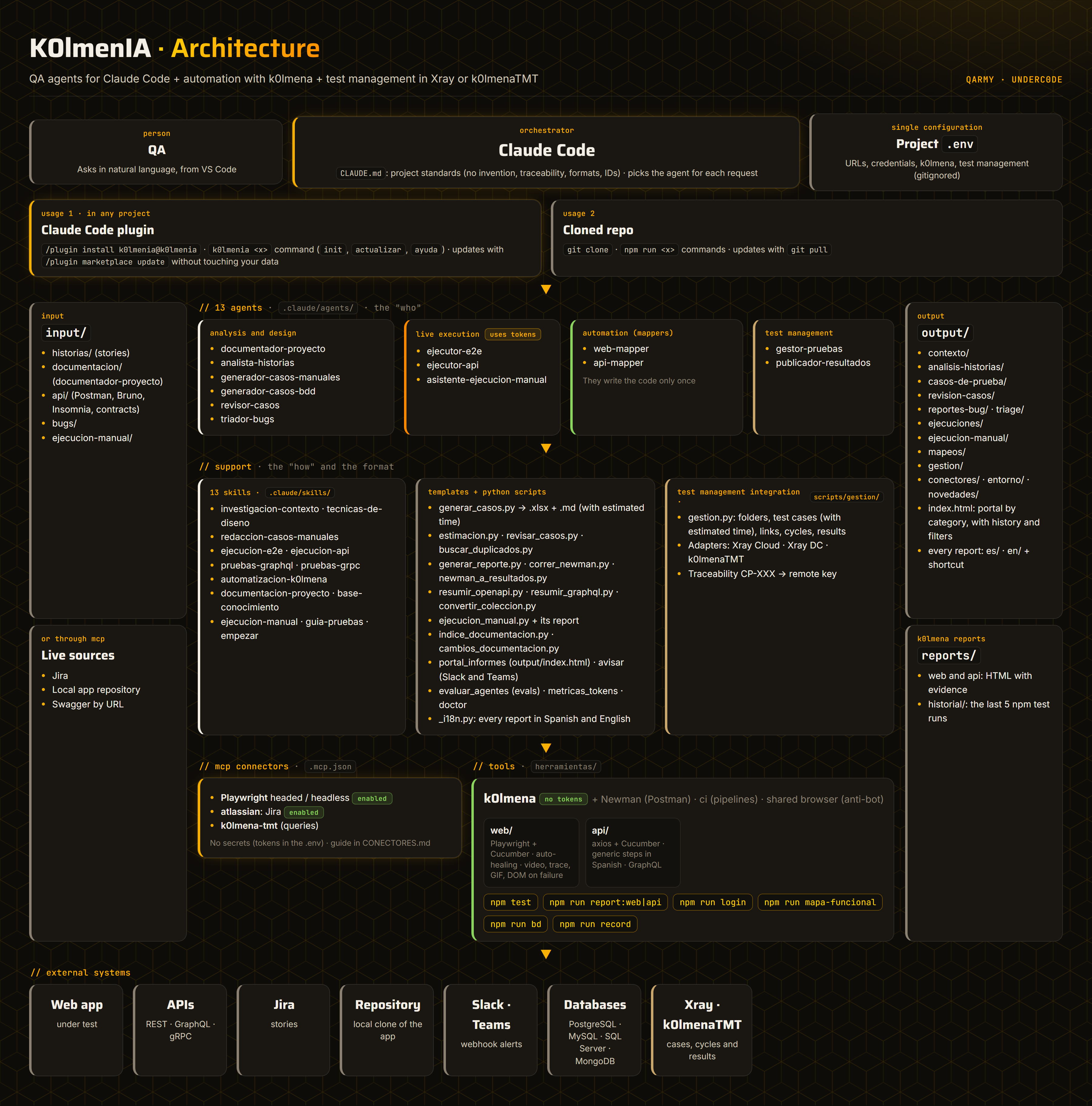
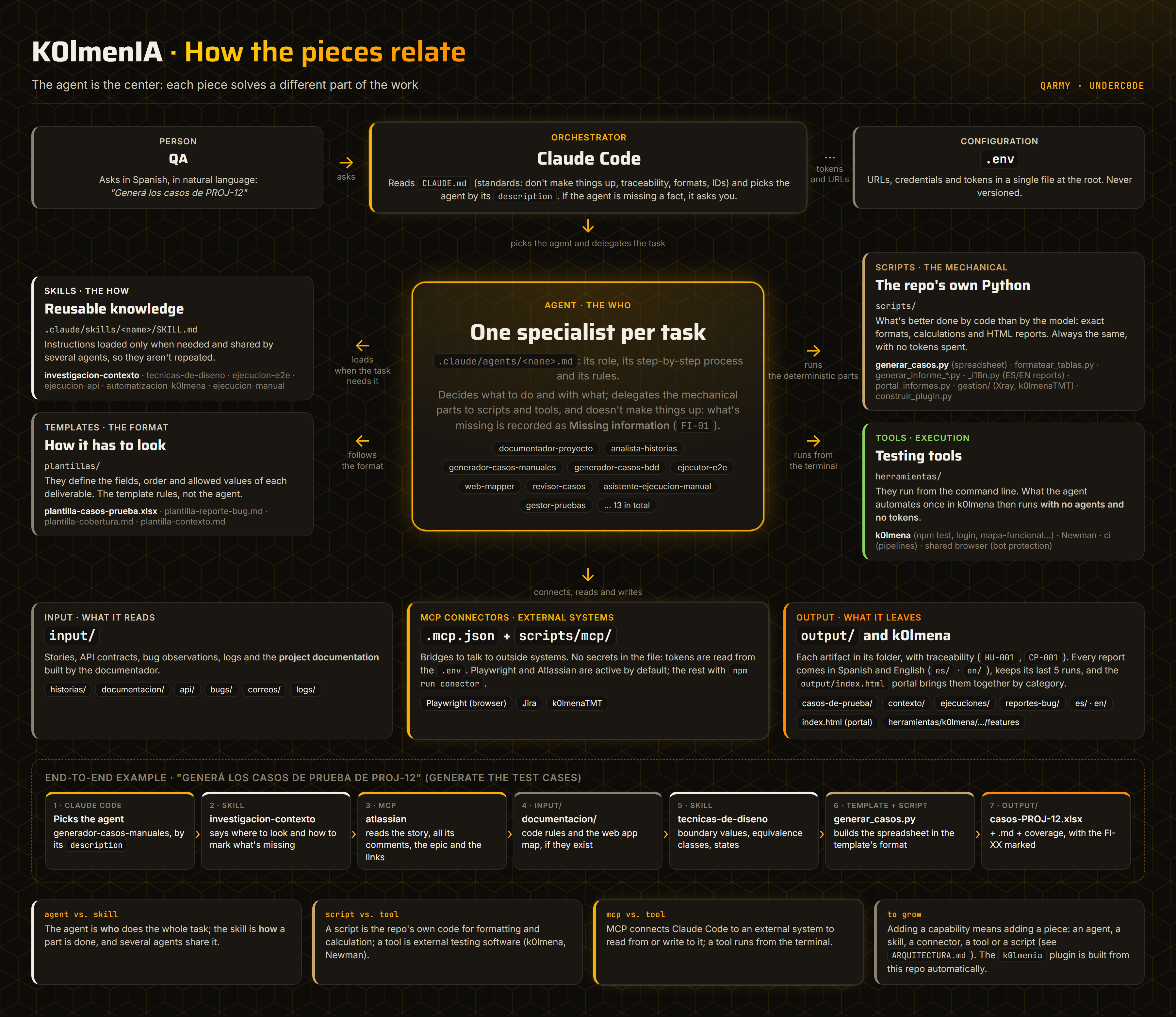
| Piece | What it is | Where |
|---|---|---|
| Claude Code | Orchestrator: interprets the request, picks the agent and applies the project standards (short on purpose: details are read on demand). | CLAUDE.md · REFERENCIA.md |
| Agents | The "who": one specialist per task. | .claude/agents/ |
| Skills | The "how": knowledge loaded when needed (design techniques, E2E and API execution, k0lmena conventions). | .claude/skills/ |
| Templates and scripts | Output format (test case sheet, coverage, bug) and deterministic HTML reports. | plantillas/ · scripts/ |
| Test management integration | gestion.py with one adapter per tool: Xray Cloud, Xray Server/DC and k0lmenaTMT (through its MCP server, without the model). | scripts/gestion/ |
| MCP connectors | Playwright and Atlassian (Jira) enabled; k0lmenaTMT ready to enable. | .mcp.json · scripts/mcp/ |
| Tools | Newman for Postman collections, k0lmena for web and API, and CI templates. | herramientas/ |
| Reports and portal | Every report in Spanish and English (es/ and en/) and the portal with categories and history. | scripts/_i18n.py · output/index.html |
| Plugin | The same K0lmenIA, installable in any project. The k0lmenia command replaces npm run; the code stays in the plugin and the data in the project. | bin/k0lmenia · scripts/construir_plugin.py |
| Input and output | User inputs and generated artifacts, organized by type. | input/ · output/ |
How it is used
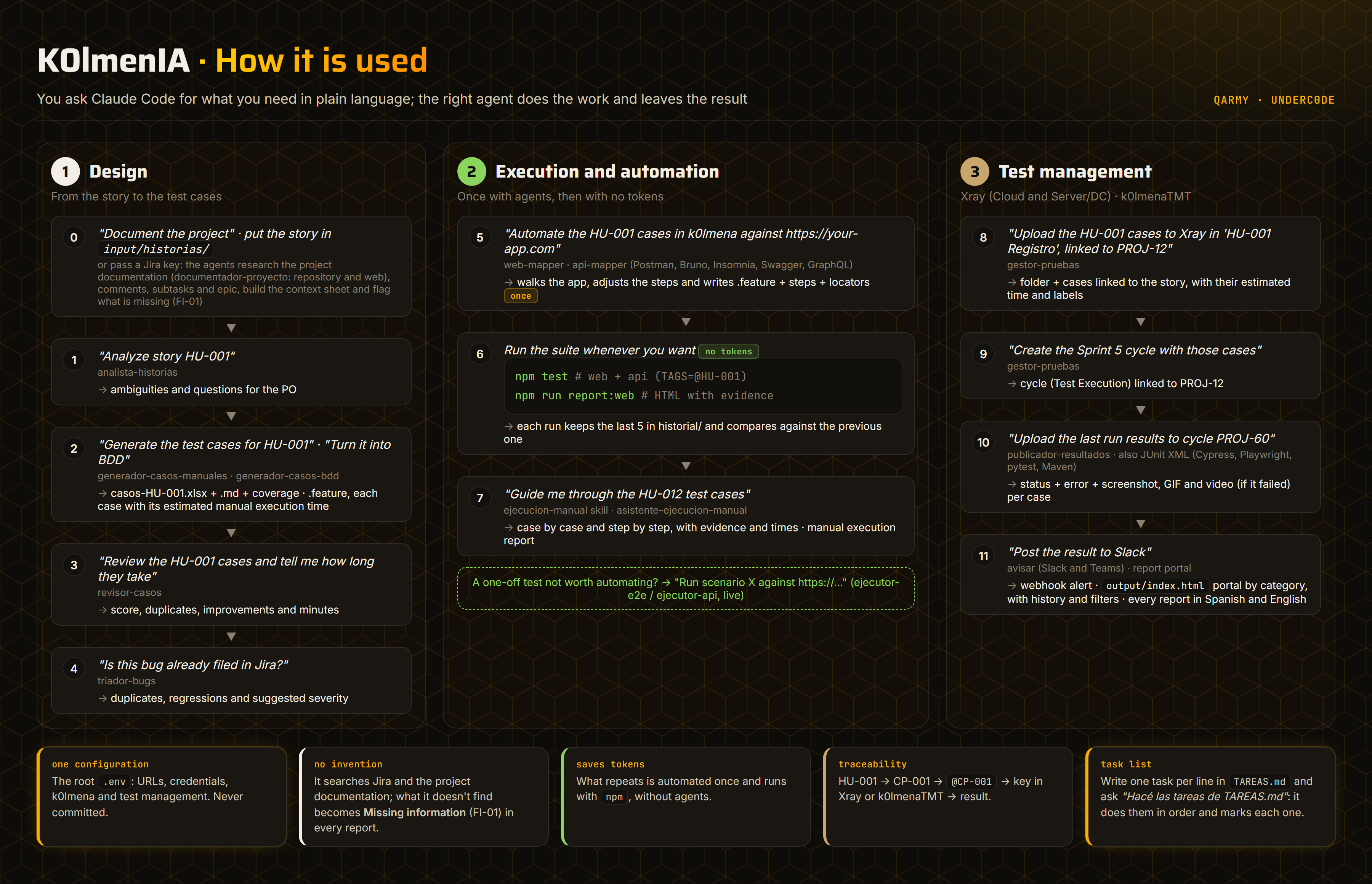
- Provide your inputsAsk "Documentá el proyecto" (document the project) to gather the context of the repository, the stories and the web in
input/documentacion/; put everything else ininput/, or pass a Jira key. - Ask in plain languageClaude Code picks the agent. You can also name it: "use the web-mapper to…".
- Review the resultIn
output/or inherramientas/k0lmena/. - Automate what repeatsAnd run it with
npm testas many times as you want, with no tokens.
Task list. To hand over several things at once, write one task per line in TAREAS.md (in the root), with its checkbox, and ask "Hacé las tareas de TAREAS.md". Claude asks everything it needs up front, does them in order and marks each one.
| # | You ask | You get |
|---|---|---|
| 0 | "Document the project" · "Gather the context of PROJ-12" | Project base + story dossier in input/documentacion/ |
| 1 | "Research the context of PROJ-12" | Context sheet + Missing information |
| 2 | "Analyze story HU-001" | Ambiguities and questions for the PO |
| 3 | "Generate the test cases for HU-001" | casos-HU-001.xlsx + coverage |
| 4 | "Review the test cases of HU-001" | Score, duplicates and execution time |
| 5 | "Upload the cases to Xray in 'HU-001 Registro', linked to PROJ-12, and create the Sprint 5 cycle" | Cases and cycle in Xray |
| 6 | "Automate the HU-001 cases in k0lmena against https://your-app.com" | .feature + steps + locators |
| 7 | npm test · npm run report:web | HTML report with evidence |
| 8 | "Upload the results to the Sprint 5 cycle" | Statuses and evidence in Xray |
| 9 | "Guide me through the HU-012 test cases" | Guided session + manual execution report |
| 10 | "Is this bug already filed in Jira?" | Duplicates, regressions and suggested severity |
| 11 | "Post the last run result to Slack" | Alert in Slack or Teams |
Agents
Claude Code picks the agent based on what you ask. There are 13 agents in .claude/agents/, grouped in four families. The full catalog (when to use each one, sample request, inputs, outputs and what it confirms) is in AGENTES.md.
Analysis and design
documentador-proyecto
Builds the project documentation for the other agents: reads the local repository (read-only), the Jira stories with their comments and links, and maps the web app's features.
Uses npm run mapa-funcional, indice_documentacion.py
Connectors atlassian, playwright-headless
input/documentacion/analista-historias
Researches the story context and detects ambiguities, gaps, risks and Missing information.
Uses formatear_tablas.py
Connectors atlassian
output/analisis-historias/generador-casos-manuales
Test cases in Excel and Markdown + coverage report with questions for the PO.
Uses generar_casos.py
Connectors atlassian
output/casos-de-prueba/manuales/generador-casos-bdd
Gherkin scenarios (English keywords, Spanish content) + coverage.
Uses formatear_tablas.py
Connectors atlassian
output/casos-de-prueba/bdd/revisor-casos
Reviews existing test cases: ambiguous steps or missing expected results, duplicates, stories without negative cases, score per case and how long manual execution takes.
Uses revisar_casos.py, estimacion.py
output/revision-casos/triador-bugs
Before filing a bug, looks for duplicates and possible regressions (Jira and local bugs) and suggests severity, component, owner and story.
Connectors atlassian
output/triage/Live execution
uses tokens on every runejecutor-e2e
Runs test cases in a real browser with Playwright MCP (headed or headless), with evidence.
Uses generar_reporte.py
Connectors playwright, playwright-headless
output/ejecuciones/ejecutor-api
Runs a Postman, Bruno or Insomnia collection with Newman (REST and GraphQL).
Uses Newman, correr_newman.py
output/ejecuciones/asistente-ejecucion-manual
Closes the guided manual execution: report with results, evidence, actual vs. estimated time and inconsistencies, and publishing after confirmation.
Uses ejecucion_manual.py, generar_informe_ejecucion_manual.py
output/ejecucion-manual/Automation with k0lmena
tokens only onceweb-mapper
Walks the web app following your test cases and generates .feature files, steps and locators.
Connectors playwright, playwright-headless
herramientas/k0lmena/web/api-mapper
Reads Postman or Swagger/OpenAPI (REST, GraphQL or gRPC), checks the endpoints and generates the .feature files.
Uses resumir_openapi.py, resumir_graphql.py
herramientas/k0lmena/api/Test management
gestor-pruebas
Folders, test cases, story links and cycles in Xray (Cloud or Server/DC) or k0lmenaTMT.
Connectors k0lmena-tmt (queries)
output/gestion/publicador-resultados
Uploads the npm test results (or a JUnit XML) to the cycle, with their evidence.
Skills
The "how" used by the agents and the main conversation; loaded only when needed. Details in .claude/skills/README.md.
| Skill | What it teaches |
|---|---|
investigacion-contexto | Research the whole story and record Missing information (FI-XX). |
tecnicas-de-diseno | Equivalence classes, boundary values, decision tables, state transitions and pairwise. |
redaccion-casos-manuales | Columns, the JSON schema of generar_casos.py, field rules and the coverage report. |
ejecucion-e2e | Run in the browser with Playwright MCP: modes, snapshots, waits and evidence. |
ejecucion-api | Run collections with Newman: base_url, token, validations and results. |
pruebas-graphql | Test GraphQL APIs: schema, partial errors, field-level authorization, depth and pagination. |
pruebas-grpc | gRPC (Protobuf, RPC modes, status codes, deadlines) and WebSocket. |
automatizacion-k0lmena | k0lmena conventions: features, steps, locators, tags and database steps. |
documentacion-proyecto | Repository reading, feature map, dossier and the sweep and update modes. |
base-conocimiento | Build and maintain the project knowledge base as requirements change. |
ejecucion-manual | Guided manual execution, case by case and step by step (/k0lmenia:ejecucion-manual). |
guia-pruebas | Assistant to choose what to test and with which agent or skill. |
empezar | Welcome and setup (/k0lmenia:empezar in the plugin). |
Requirements
| To… | You need |
|---|---|
| Use the agents | Claude Code + a Claude account (Pro, Max, Team or Enterprise) or the Anthropic API. VS Code recommended. |
| Test cases, reports and management | Python 3.10+ (pip install -r requirements.txt; on Mac/Linux, pip3) |
| Run live E2E tests | Node.js 20+ (22 LTS recommended) and Playwright browsers |
| Postman collections | Newman |
| Automate with k0lmena | Node.js 20+ (22 LTS recommended) |
Installation
The easiest way is the plugin (see the next section). If you prefer to clone the repo:
# 1. Claude Code (macOS / Linux; on Windows follow the official guide)
curl -fsSL https://claude.ai/install.sh | bash

# 2. The repository
git clone https://github.com/underc0delabs/k0lmenIA.git
cd k0lmenIA
pip install -r requirements.txt   # on Mac/Linux: pip3 install -r requirements.txt
npm install                       # k0lmena (installed in herramientas/k0lmena)
npm run configurar                # your app and your tools: creates the .env and enables the connectors

# 3. Check that everything is ready
npm run doctor

# 4. Get to work
code .
claude
On Windows the Python command is python; on Mac and Linux, python3 and pip3. For live E2E runs: npx playwright install; for Postman collections: npm install -g newman.
As a Claude Code plugin
It installs as a plugin and works in any project folder, without cloning this repo. Updates arrive automatically and never touch your work.
claude plugin marketplace add underc0delabs/k0lmenIA
claude plugin install k0lmenia@k0lmenia
- Open Claude Code in your project folderAnd type
/k0lmenia:empezar: it prepares the project (folders,.envand k0lmena), checks that everything is installed, helps you connect Jira and suggests the first task. - Ask for what you needIn plain language: "Write the test cases for PROJ-12", "Test the login in the browser".
| Topic | How it works |
|---|---|
| Commands | What is npm run <x> in the repo is k0lmenia <x> in the plugin (k0lmenia ayuda lists them). Agents are called k0lmenia:<agent>. |
| What it installs and where | The code stays in the Claude Code cache and updates itself. k0lmenia init leaves in your project input/, output/, the .env, TAREAS.md, your copy of k0lmena and the same permissions as the repo. It never overwrites an existing file. |
| Updating | Every push to main is published to the plugin branch. Turn on auto-update (/plugin → Marketplaces → k0lmenia) or run /plugin marketplace update k0lmenia. |
| What's new | After an update, Claude tells you at the start of the session what changed; on demand, k0lmenia novedades (with the repo, npm run novedades). |
| Updating k0lmena | k0lmenia actualizar: your tests are not touched; if you changed a framework file, the new version is left next to it as .nuevo. |
Configuration: the .env file
There is a single .env, in the root. The agents, k0lmena and the test management scripts use it. It is never committed; the commented template is .env.example. The easy way: npm run configurar.
| Group | Variables |
|---|---|
| App under test | APP_URL APP_USER APP_PASSWORD |
| API | API_TOKEN API_BASEURL |
| Web (k0lmena) | BROWSER HEADLESS VIEWPORT_WIDTH VIEWPORT_HEIGHT LOCALE TIMEZONE |
| Execution and evidence | TAGS PARALLEL EVIDENCE VIDEO TRACE K0LMENA_AUTO_HEALING |
| Databases | DB_CONEXIONES + per connection DB_<NAME>_MOTOR _HOST _PUERTO _BASE _USUARIO _CLAVE _ESCRITURA _PRODUCCION |
| App repository | REPO_RUTA_LOCAL |
| Test management | GESTION_HERRAMIENTA GESTION_PROYECTO + Xray or k0lmenaTMT credentials |
Use credentials from a test environment. The agents read secrets from the .env: never paste a token in the chat.
Project documentation
The documentador-proyecto gathers the real project context in input/documentacion/, so the other agents work on what exists instead of assumptions.
| Source | What it reads |
|---|---|
| App repository | The local clone (REPO_RUTA_LOCAL): README and docs, validations and limits, messages, states, roles and permissions, routes and API contracts (read-only). |
| Stories | Jira with all their comments, subtasks, epic, links and bugs. |
| The application | npm run mapa-funcional: pages, menus, forms with each field, buttons and messages (GET only, nothing is submitted). |
It leaves a project base, one dossier per story and an index (INDICE.md), each fact with its source. It is incremental: asking to update the documentation redoes only what changed, and npm run actualizar-conocimiento can run it on a schedule.
Context research and "Missing information"
Before analyzing, writing test cases or automating a story, the agents research its full context (skill investigacion-contexto) instead of assuming.
| Source | What they check |
|---|---|
| Project documentation | First: the index and the story dossier in input/documentacion/. |
| Jira story | Description, criteria, status, labels, components and attachments. |
| Comments | All of them: decisions made later replace the description. |
| Subtasks, epic and linked issues | General rules, sibling stories and known bugs in the flow. |
Contracts and input/ | Swagger, Postman and local documentation. |
Whatever is not found in any source is marked as Missing information with one ID per story (FI-01, FI-02, …) that travels to the test case sheet, the .feature files (@falta-info @FI-01), coverage reports, mappings, execution reports and what is published to Xray or k0lmenaTMT.
Design and execution
Analyze a story analista-historias
Reviews each criterion and delivers analisis-HU-001.md with ambiguities, gaps, risks, uncovered cases and questions for the PO.
Write the test cases generador-casos-manuales
Sheet casos-HU-001.xlsx, its .md and the coverage report, with positive, negative and edge cases and the estimated execution time of each case.
Turn it into BDD generador-casos-bdd
Gherkin scenarios with @HU-001 and @CP-XXX, ready to automate.
Review existing test cases revisor-casos
Score per case, problems with a suggestion, duplicates, stories without negative cases and manual execution time.
Run in the browser ejecutor-e2e
HTML report with screenshots of each step in output/ejecuciones/.
Run an API collection ejecutor-api
Postman, Bruno or Insomnia with Newman, with the token and URL from the .env, and its HTML report.
Automation with k0lmena
k0lmena lives in herramientas/k0lmena/. The mapper agents check your test cases against the real app and write the automation only once; after that the suite runs as many times as you want, with no tokens.
npm test                          # web + API
npm run test:web                  # also: test:api · test:all
TAGS=@HU-001 npm test             # filter by tag
npm run report:web                # rebuilds the HTML report (also: report:api)
| Suite | Passing test | Failing test |
|---|---|---|
| Web | Final screenshot (+ optional GIF) | Full video, screenshot, error, browser and Node logs, Playwright trace |
| API | Request and response (Authorization hidden) | The same + the failed validation |
npm run login saves a session you log into by hand (captcha, 2FA, SSO) so npm test and the agents' browser start logged in. Also: npm run mapa-funcional, npm run record, npm run record:generator, npm run debug and locator auto-healing. Details in herramientas/k0lmena/README.md.
Test management: Xray and k0lmenaTMT
Set GESTION_HERRAMIENTA (xray-cloud · xray-dc · k0lmena-tmt), GESTION_PROYECTO and the credentials in the .env.
The gestor-pruebas creates folders, test cases, links and cycles (and with sincronizar-casos updates the ones that changed); the publicador-resultados uploads status, error and evidence. It works for k0lmena and for any framework that produces JUnit XML. Traceability (output/gestion/<HU>-<tool>.json) prevents duplicates.
k0lmenaTMT
It integrates with the personal token (K0LMENA_TMT_TOKEN). Uploads are done by scripts/gestion through its MCP server, without passing each case through the conversation; the k0lmena-tmt connector is for queries from the chat. Keys: TC-<id> (cases) and CY-<id> (cycles).
k0lmena in the pipeline (CI)
The k0lmena suites run on their own in the team's pipeline, with no agents or tokens.
npm run ci -- generar --plataforma github                # → .github/workflows/k0lmena.yml
npm run ci -- generar --plataforma gitlab --suite all    # → .gitlab-ci.yml
npm run ci -- generar --plataforma jenkins               # → Jenkinsfile
npm run ci -- generar --plataforma azure --suite api     # → azure-pipelines.yml
The pipeline installs k0lmena and Chromium, runs the suites and keeps the reports as an artifact; with GESTION_CICLO it publishes the results to Xray or k0lmenaTMT. The whole .env goes in as a pipeline secret. Details in herramientas/ci/README.md.
Apps with anti-bot protection
If the app uses Cloudflare, Akamai, DataDome, Imperva, AWS WAF or a captcha, it may block the automated browser. K0lmenIA does not try to bypass it.
| What it does | How |
|---|---|
| No false failures | The scenario is marked Blocked: anti-bot (also in Xray and k0lmenaTMT) and the agents stop and report it. |
| Bypass header | QA_BYPASS_HEADER and QA_BYPASS_TOKEN in the .env: sent only to the app's hosts. |
| Real Chrome and human pace | NAVEGADOR_CANAL=chrome and RITMO_HUMANO=si. |
| Manual plan B | npm run login: you solve the challenge by hand and the session is saved (SESION=si). |
Database checks
k0lmena includes steps to check in PostgreSQL, MySQL / MariaDB, SQL Server and MongoDB what your tests saved. The mappers add them to a .feature only when you ask.
Then el registro de "usuarios" donde "id" es "{idUsuario}" tiene:
  | campo  | valor  |
  | estado | ACTIVO |
npm run bd -- conexiones npm run bd -- consultar --sql "SELECT id, estado FROM usuarios WHERE email = ?" --param ana@test.com
Read-only by default. To prepare or clean data, the connection needs DB_<NAME>_ESCRITURA=si; with DB_<NAME>_PRODUCCION=si it never writes. Sensitive columns are masked.
Bug triage
The triador-bugs checks whether the bug already exists in Jira or in the local bugs, detects regressions of closed bugs and suggests severity, priority, component, owner and story. Creating or linking in Jira only happens after you confirm.
Guided manual execution
With the ejecucion-manual skill, the conversation guides you through the manual test cases: one case and one step at a time, the result, the evidence, actual vs. estimated time and the bug written on the spot if something fails.
/k0lmenia:ejecucion-manual HU-012                # in Claude Code
npm run ejecucion-manual -- estado --sesion output/ejecucion-manual/HU-012
The session is saved in output/ejecucion-manual/<HU>/sesion.json, so you can pause and resume another day. When closing, the asistente-ejecucion-manual builds the report (ES/EN) and flags inconsistencies; publishing to Xray or k0lmenaTMT only happens after confirmation.
Run history
Each npm test run keeps its last 5 runs with their evidence in herramientas/k0lmena/reports/<suite>/historial/, and each report includes a Run evolution section: what is new, what was fixed and how the indicators evolve.
Report portal
output/index.html opens with a home dashboard: global indicators (each npm test suite with its pass rate and trend, open bugs, today's and this week's reports), alerts with what needs attention and one card per category with each tool's latest report. Below, All reports, with filters by text, tool, story, status and dates. It builds itself (npm run portal) and opens with a double click.
Reports in Spanish and English
output/ejecucion-manual/HU-012/
├── informe-ejecucion-manual.html      shortcut: opens the chosen language (Spanish by default)
├── es/informe-ejecucion-manual.html   Spanish
├── en/informe-ejecucion-manual.html   English
└── sesion.json analisis.json …        the evidence is shared by both
The flag at the top right switches languages and remembers your choice. What the agent writes is translated by the agent itself (an "en" block in the JSON); the interface is translated by the script with a dictionary (scripts/i18n/en/), with no tokens.
Slack and Teams alerts
npm run avisar -- --titulo "Regression" --texto "3 scenarios failed" --nivel error
npm run avisar -- --desde-cucumber herramientas/k0lmena/reports/web/cucumber-report.json
Posts through a webhook (SLACK_WEBHOOK_URL, TEAMS_WEBHOOK_URL in the .env). The triager uses it when asked.
Agent evals
The evals (evals/) measure the quality of what the agents produce: each case has deliberate traps (ambiguities, contradictions, limits, secrets) and deterministic checks. They run in an isolated workspace with claude -p and leave a report with regressions against the previous run.
npm run evals -- --listar
npm run evals -- --correr --agente generador-casos-manuales
They use tokens: each case is a full conversation, with a cap per case. --referencia and --solo-verificar check without running the agent.
Token usage
python scripts/metricas_tokens.py reads the project's Claude Code transcripts (only the counts, never the text), attributes usage to each agent and builds a report with the estimated cost per agent, day and model.
MCP connectors
| Connector | What for | Authentication |
|---|---|---|
playwright · playwright-headless | Browser for the E2E runner, the web-mapper and the documenter | Enabled by default |
atlassian | Jira: stories, criteria, comments and links | Enabled by default: your account (OAuth) or API token |
k0lmena-tmt | Queries in k0lmenaTMT (uploads go through gestion.py) | Personal token |
npm run conector                            # lists the connectors and which ones you have enabled
npm run conector -- activar k0lmena-tmt     # only for you; restart Claude Code
None of them contain secrets: credentials are read from the .env. npm run doctor tells you what each enabled connector is missing. Full guide in CONECTORES.md.
Conventions
| Item | Format |
|---|---|
| Stories | HU-001 |
| Acceptance criteria | CA1 · CA2 |
| Manual test cases | CP-001 |
| API test cases | CP-API-001 |
| Bugs | BUG-001 |
| Missing information | FI-01 · @falta-info @FI-01 |
| Scale | Values |
|---|---|
| Severity and priority | Crítica · Alta · Media · Baja (critical, high, medium, low) |
| Case status | N/A · Pendiente · En ejecución · Aprobado · Fallido · Bloqueado |
Tags in k0lmena
| Where | Tags |
|---|---|
| Feature | @HU-001 @web |
| Scenario | @CP-001 (@smoke if critical) · @bloqueado · @falta-info @FI-01 |
| Files | <type>/features/HU-001-<slug>.feature · steps/HU-001.steps.ts · locators/HU-001.locators.ts |
Repository structure
k0lmenIA/
├── CLAUDE.md               context and standards (short on purpose)
├── REFERENCIA.md           output of each agent, commands and scripts
├── AGENTES.md              agent catalog
├── ARQUITECTURA.md         how the repo grows
├── CONECTORES.md           how to enable the MCP connectors
├── CHANGELOG.md            changes in each version
├── .env.example            variables template
├── .mcp.json               MCP connectors (no secrets)
├── package.json            shortcuts (npm test…)
├── docs/                   this documentation, PDF and diagrams
├── tests/                  script tests
├── evals/                  agent evals
├── .claude/agents/         the 13 agents
├── .claude/skills/         the 13 skills
├── input/ · output/        inputs and results
├── plantillas/             bug, test case sheet, coverage
├── scripts/                cases, reports, test management (Xray and k0lmenaTMT), connectors, portal and doctor
└── herramientas/
    ├── newman/             Postman, Bruno and Insomnia collections
    ├── ci/                 pipeline templates
    └── k0lmena/            automation framework (web and API)
FAQ
What happens if the story is missing information?
FI-01) with the question for the PO, and travels to every artifact.I don't know what I'm missing to install or configure
npm run doctor: it checks Python, Node, k0lmena, Playwright, Newman, the fonts, the .env, the integrations, the connectors and git, and tells you how to fix each one.A new agent doesn't show up
npm test runs 0 scenarios
TAGS doesn't match.A scenario never runs
@bloqueado: the reason is in a comment above it.An agent returns "Necesito que confirmes" (I need you to confirm)
An MCP connector doesn't connect
npm run doctor: it tells you which variable is missing in the .env. Atlassian is authorized from /mcp.Extending the project
- Create the file
.claude/agents/my-agent.mdwithnameanddescriptionfrontmatter. The description is what Claude Code uses to decide when to invoke it. - Write the bodyRole, inputs, process, output and rules.
- Define the formatIf it produces its own format, add its template in
plantillas/or its script inscripts/, and its folder inoutput/. - Report in two languagesIf it builds an HTML report, write it with
escribir_bilingueandlocalizar(scripts/_i18n.py).
Rebuild this documentation
node docs/generar.js # diagrams (PNG) and PDF in both languagesThe site is docs/index.html (published with GitHub Pages at underc0delabs.github.io/k0lmenIA), with its English version in docs/en/index.html. The PDFs are published by the documentacion.yml workflow in the docs release.
License
MIT license — © 2026 QARMY. k0lmena is an open source project by Danilo Vezzoni. Made by the Underc0de community.